How to use Desmos on the SAT: the seven moves that cover most questions
 By Ronak, SAT Math, Stuck in SAT
· 9 minute read
Desmos is the graphing calculator built into Bluebook, and you can open it on every Math question of the digital SAT. Most of its value comes from seven moves: regression, solving a system, a slider for an unknown constant, clicking the vertex or intercepts, checking equivalent expressions, solving an equation directly, and mean or median. Learn what to type for each, and learn when not to use it.
Where is Desmos on the SAT?
In Bluebook, the app the digital SAT runs on, there is a calculator button at the top right of every Math question. It opens the Desmos graphing calculator in a window you can move and resize. You can also bring your own approved calculator, but for the seven moves below Desmos is the faster tool.
The Bluebook version looks and works like the calculator at desmos.com. Practise in the Bluebook practice tests as well, so the window and the on-screen keypad are familiar on test day.
The seven moves
1. Regression: from points to an equation
When a question gives a table or two points and asks about the line or curve through them.
y1 ~ mx1 + bFull guide: regression in Desmos
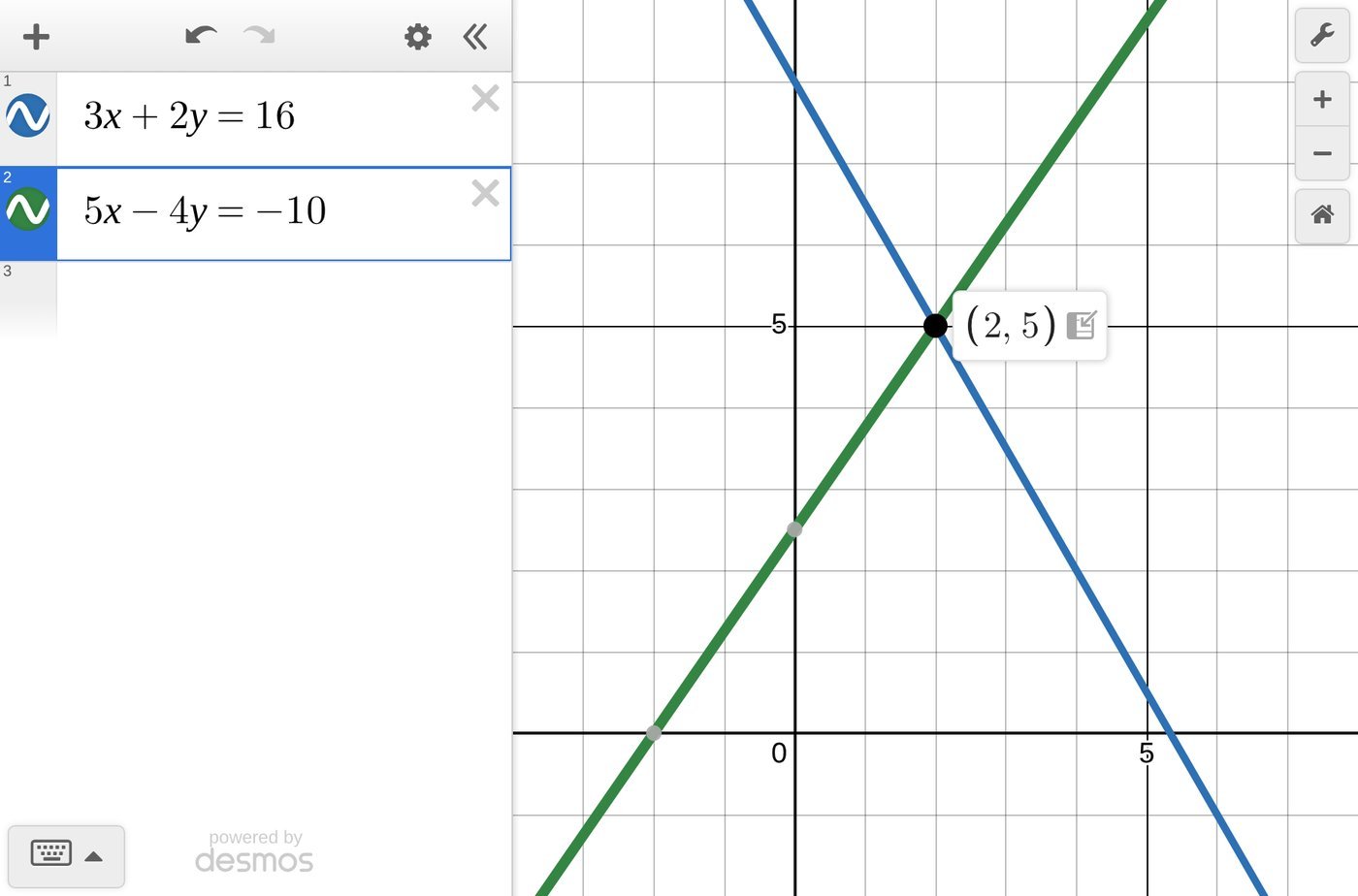
2. Systems: click where the graphs cross
Type both equations as written. The crossing point is the solution.
Full guide: systems of equations in Desmos
3. Slider: an unknown constant
For "exactly one solution", "no solution" and "for what value of k". Type the equation with the k in it, add the slider, and drag until the graph matches the question.
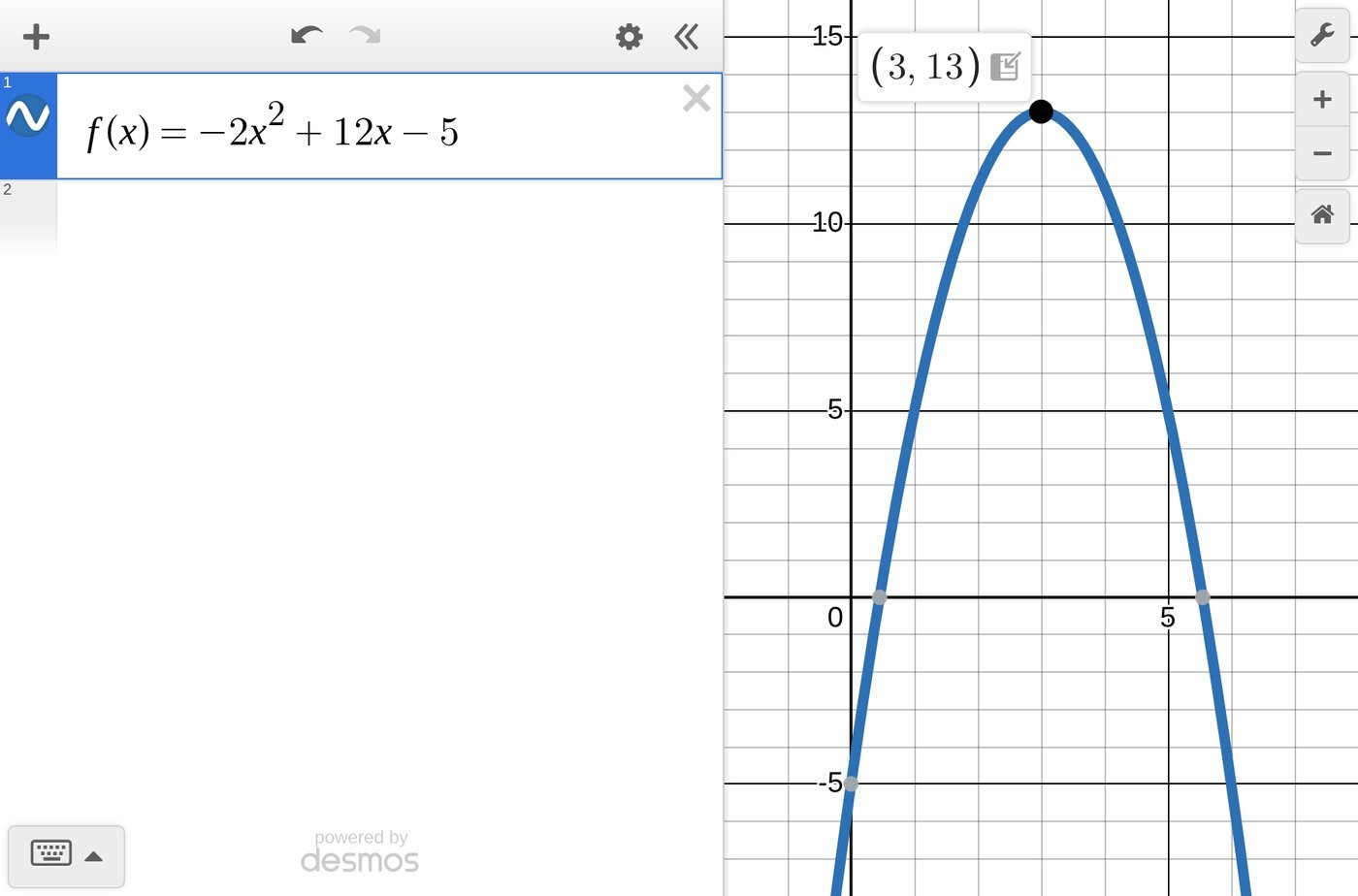
4. Vertex and intercepts: click the grey dots
Maximum, minimum, zeros, x-intercepts and y-intercepts are all one click on the graph.
Full guide: vertex, maximum and minimum
5. Equivalent expressions: one curve or two
Graph the original and a choice. If you see one curve, they are equivalent.
Full guide: equivalent expressions
6. Solve an equation: read the vertical line
Type an equation in x and Desmos draws a line at each solution. It never shows an extraneous one.
Full guide: solving equations in Desmos
7. Mean and median
mean(12,15,15,18,21,24,35)median(12,15,15,18,21,24,35)Full guide: mean and median in Desmos
What to type: a short reference
| You want | Type |
|---|---|
| A power | x^2 then the right arrow key |
| A fraction | / and use brackets, (x+2)/(x-1) |
| A square root | sqrt |
| Absolute value | | or abs( |
| Pi | pi |
| Less than or equal to | <= |
| A subscript, as in x1 | x1 |
| The regression symbol | ~ |
| A table | The plus button, then table |
When is Desmos slower than thinking?
Students who learn Desmos sometimes start using it for everything, and lose time. Our rule for our own students is simple: if you can see the answer in under ten seconds, do not open the calculator.
- Word problems where the work is setting up the equation. Desmos helps after that step, not before.
- Geometry and trigonometry with a figure. These are about a relationship in the figure. Desmos is only the arithmetic.
- Short algebra. Distributing, combining like terms and one-step equations.
- Questions about meaning. "What does the 5 represent in this model?" has no graph.
How should you practise?
- Learn one move at a time. Do five questions of that type using only that move.
- Then mix. The skill on test day is recognising which move a question needs in the first few seconds.
- Time yourself both ways on a few questions. You will find which types are faster by hand for you.
- Practise on the on-screen keypad too, in case the test device keyboard is unfamiliar.
Questions students ask us
Is Desmos allowed on the SAT?
Yes. It is built into Bluebook and available on every question of the Math section.
Is the SAT Desmos the same as desmos.com?
It is the same graphing calculator, embedded in the test app. The main features, including tables, regression and sliders, work the same way. Practise inside Bluebook practice tests to get used to the window.
Can I use Desmos on the Reading and Writing section?
No. The calculator is only available in the Math section.
Should I still bring my own calculator?
You may bring an approved one, and some students like having it for quick arithmetic. It is not required.
How many SAT Math questions can Desmos help with?
It depends on the test. In our experience a large share of the algebra and advanced math questions can be solved or checked with one of the seven moves, and very few geometry questions can.
Can I get a high Math score using only Desmos?
No. Desmos is a tool for speed and for checking. The hardest questions still need you to understand what is being asked.
Read next
- How to do regression in Desmos on the SAT
- How to solve a system of equations in Desmos on the SAT
- How to use a Desmos slider on the SAT
About the authorRonak teaches SAT Math at Stuck in SAT. He has a Master's in Applied Mathematics and has taught for 8+ years, most of it one to one. He wrote the SAT Desmos Bible. Our story
We wrote every question on this page ourselves. The screenshots are from the Desmos graphing calculator. Found a mistake? Tell us and we will fix it.